Online store audit: what to measure and how much it costs
Online store audit: what to measure (speed, Google, purchase path, data), the SafeVelo example from 68 to 98 mobile points, and a price range of PLN 1,040 to 5,200.

An online store audit gives you a list of the problems that block sales, ordered by possible effect and with the cost of each fix added. It shows where the store loses customers, which data cannot be trusted and where to start the work.
An analysis like this makes sense when traffic does not turn into orders, the store is slow on a phone or you are planning to rebuild it. It is also useful before a larger campaign, a change of theme, or expanding sales with new products or integrations.
What an online store audit is and when it makes sense
An online store audit is a structured analysis of how the store works, how customers behave and what the sales data says. Its result should be a specific plan of work that helps you decide on fixes or a rebuild.
The first signal to act is traffic without a matching number of orders. The source of the problem may be a slow product page, an unclear delivery cost, an error in a form or an awkward payment. Without checking the customer’s whole route it is easy to improve things that have little effect on sales.
An audit also makes sense when the store clearly slows down on phones. The owner often looks at it on a fast computer, where loading problems are less visible. A customer on a phone with a weaker connection may see a completely different site.
It is good to run the analysis before a migration, a change of theme or a larger rebuild. The results show which solutions can stay, what needs improving and which errors could carry over into the new version of the store.
Another signal is paid campaigns run without reliable purchase data. If GA4 does not record transactions, the advertising budget is judged on clicks and visits. There is no information about which activities really bring in revenue.
The audit itself does not fix the problems it finds and does not replace ongoing SEO work. Nothing is changed in the store during the analysis. First you get the results, the recommendations and a quote, and then you decide on the scope of implementation.
What to measure in an online store audit: four areas

AI-generated image
A full e-commerce audit should cover loading speed, visibility in Google, the path to purchase and product data. These areas connect the technical side of the store with what the customer sees and does.
Loading speed and Core Web Vitals
LCP measures the time needed to display the largest visible element, usually a product image, a banner or a large block of content. A good result is up to 2.5 s, and a result over 4 s is poor.
INP shows how quickly the store responds to what the user does, for example clicking a variant or the add to basket button. A result up to 200 ms is good, while over 500 ms means a clear problem.
CLS measures how elements shift during loading. A good result is at most 0.1, and a poor one starts above 0.25. A high CLS can make a button move just before it is clicked.
Slow performance tends to come from a heavy theme, too many plugins, large images, hosting and marketing scripts. Measurement on a phone comes first, because that is where the limits of the device and the connection show most.
Visibility in Google
This part of the audit checks whether Google can reach the categories and product pages, read them correctly and show them in search results. The analysis covers indexing, URLs, titles, descriptions and product data.
Filters and product variants need particular attention. They can create many similar URLs that duplicate content and make it harder for the search engine to choose the right page. The audit also checks how products withdrawn from sale are handled, so that old URLs do not lead customers to a dead end.
The path to purchase
The auditor goes through the store the way a customer does: from the product page through the basket, the choice of delivery and payment, to the order confirmation. Every stage should be understandable and possible to complete on a phone as well.
Problems often appear in forms, error messages and the choice of delivery. A customer may abandon the purchase when they learn the full cost of the order too late or do not know how to correct a wrongly filled field. Checking the path also covers unusual situations, such as an out-of-stock product or a rejected payment.
Product data, analytics and technical basics
GA4 should record the most important actions, including adding a product to the basket and the purchase. The mere presence of the analytics code confirms nothing yet. You have to do a test run and check whether the events contain correct data.
Prices, stock levels and the information passed between the store and its integrations also need checking. In the basic technical scope the audit covers the SSL certificate, visible errors and keyboard operation. Contrast and field labels are checked too, because they affect readability and the ability to place an order.
| Area | What I measure | With what | Goal |
|---|---|---|---|
| Speed | LCP, INP and CLS on a phone | Lighthouse, user data | LCP up to 2.5 s, INP up to 200 ms |
| Visibility | Indexing, URLs, metadata and products | Search Console, analysis of the store | Reachable categories and the right URLs |
| Path to purchase | Product, basket, delivery, payment | Going through a test order | A purchase possible without errors |
| Data and technology | Events, prices, SSL and accessibility basics | GA4, store admin, manual test | Reliable data and working orders |
Which numbers say the store has a problem
In Core Web Vitals a good LCP is up to 2.5 s, INP up to 200 ms and CLS up to 0.1. Results above 4 s for LCP, 500 ms for INP and 0.25 for CLS point to poor page quality.
The average basket abandonment rate in e-commerce is about 70% according to research by the Baymard Institute. It is a reference point that has to be set against your own data, your way of measuring and the specifics of the store. The figure alone will not point to the cause, which is why the analysis covers each stage of the order.
A large share of sessions from phones makes mobile measurements more important. If most customers buy on a small screen, a high score on a computer does not describe their experience. You have to check the right devices, the pages of popular products and the stages of the purchase.
A lab measurement is taken in controlled conditions and makes it easier to compare successive versions of a page. Data from real users shows how the store works on different phones, connections and browsers. The fullest picture comes from combining both sources.
| Metric | Good result | Poor result | What usually spoils it |
|---|---|---|---|
| LCP | Up to 2.5 s | Over 4 s | Images, theme, hosting, scripts |
| INP | Up to 200 ms | Over 500 ms | Scripts, plugins, heavy interface |
| CLS | Up to 0.1 | Over 0.25 | Images without dimensions, banners, fonts |
A practical example: SafeVelo, mobile from 68 to 98 points
The SafeVelo audit showed how traffic and sales data help to set priorities. The analysis carried out on 12 August 2026 covered UX, UI, accessibility, performance, SEO and code.
SafeVelo was a small Polish WooCommerce store with about 28 products in three categories. Phones accounted for 73% of sessions, so mobile speed mattered directly to most visitors.
As many as 45% of entries started on the page of the TR70 radar. This product generated about 95% of revenue, so its page needed particular attention. The audit listed 25 findings, including an LCP reaching 13 s on a phone.
It also found that GA4 had no purchase events, even though paid campaigns were running. So the store had no reliable data for judging sales from ads.
A new WooCommerce theme was built on the basis of the audit. It went live on 4 September 2026 with no break in sales. The results after the change were collected on 6 September 2026.
The measurements before and after the launch were lab measurements taken on the same computer. That means they show the technical change in comparable conditions. Sales results are still being measured, so at this stage the rebuild should not be credited with an effect on revenue.
| Metric | Before | After |
|---|---|---|
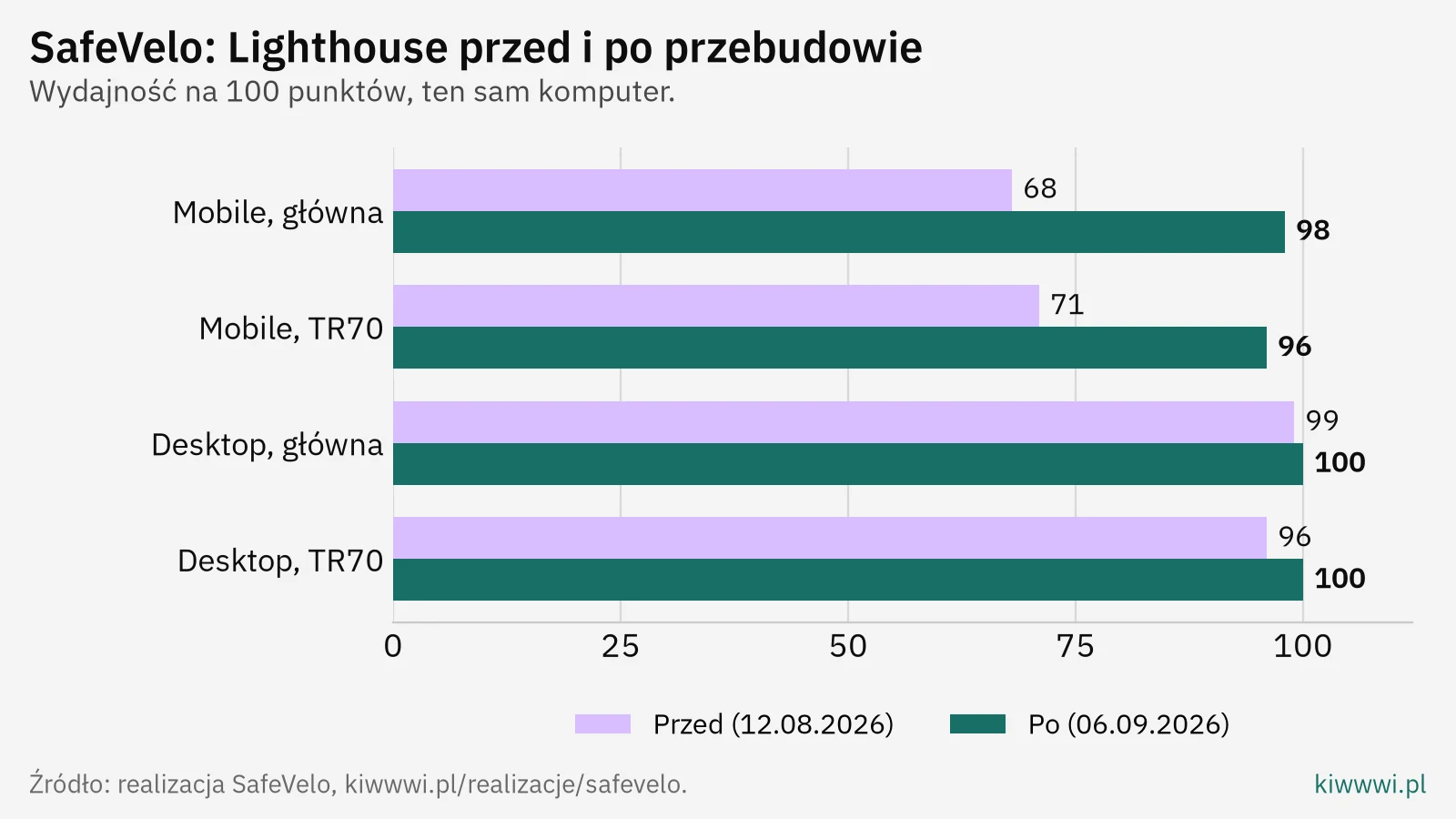
| Mobile performance, home page | 68/100 | 98/100 |
| Mobile performance, TR70 page | 71/100 | 96/100 |
| Mobile LCP, home page | 8.9 s | 2.0 s |
| Mobile LCP, TR70 page | 4.5 s | 2.3 s |
| CLS, TR70 page | 0.188 | 0.007 |
| Accessibility | 92 to 93/100 | 100/100 |
AI-generated image
Desktop performance of the home page rose from 99/100 to 100/100, and of the TR70 page from 96/100 to 100/100. The biggest change, though, was on mobile devices, where most sessions came from.
What an online store audit looks like step by step

AI-generated image
A store audit consists of six steps and usually takes a few working days from the moment access is handed over. During the analysis the store runs as normal and no changes are made to its configuration.
- Hand over access to the WordPress admin and, if available, Google Search Console and Google Analytics.
- Measure the speed and visibility of the most important page types, with particular attention to phones.
- Go through the purchase path from landing on a product page to the order confirmation.
- Check the analytics and product data, including purchase events, prices and stock levels.
- Order the recommendations by effect and add the cost of implementation to each item.
- Discuss the report, the priorities, the possible options for the work and their effect on how the store runs.
A good report describes the problem in plain language, shows where it occurs and explains its effect on the customer or the data. A recommendation should be specific enough to be priced and handed over for implementation.
The order of the items matters too. An error that makes payment impossible needs a faster reaction than a cosmetic fix on a rarely visited page. A cost given next to each recommendation lets you fit the scope of work to the budget without guessing.
How much an online store audit costs
The price of an online store audit runs from PLN 0 for a review you do yourself to about PLN 1,040 to 5,200 net for a full analysis by a studio or an agency. Automated tools usually cost from a few dozen to a few hundred zloty a month.
A review of your own using Google’s tools takes a few hours of work. It lets you find some of the performance and visibility problems, but you have to understand the results yourself and set the order of repairs.
Automated reports monitor the metrics regularly and help you catch a change. Their recommendations tend to be general, especially for problems with payments, WooCommerce configuration or customer behaviour.
A full e-commerce audit combines data with a manual check of the store. The search phrase “online store audit price” is hard to answer with one rate, because the scope depends on the number of page templates and products, the integrations and the areas examined.
Implementing the fixes is priced separately. Before the audit starts I give the price of the analysis, and the conversation and the quote are free. A short recording with the most important conclusions can be a free first step before ordering a written report.
| Option | Cost | What you get | Who it is for |
|---|---|---|---|
| Your own review | PLN 0 and a few hours | Tool results, your own conclusions | A small store and a first diagnosis |
| Automated tools | From a few dozen to a few hundred zloty a month | Monitoring and automatic alerts | Regular checks of selected metrics |
| Studio audit | About PLN 1,040 to 5,200 net | Analysis, priorities, report and costs | A store that needs a plan of changes |
What to do after the audit
After the audit you first implement the fixes that block the purchase or the measurement of sales. Speed problems come next, and then content and less visited pages.
Individual fixes are enough when the theme is stable, the purchase path works and the problems concern specific settings, images or scripts. The work can then be split into stages according to the priorities written in the report.
A new theme or a larger rebuild makes sense when the errors come from the construction of the whole store, overlapping plugins and code that is hard to maintain. The decision should be backed by the audit results, the cost of the fixes and the risk of carrying on with the current solution.
After every larger change the measurements have to be repeated. A theme update, a new integration, an extra marketing script or a rebuilt product page can affect speed, analytics and the purchase. Regular checks let you find a problem before the next campaign.
FAQ: online store audit
How long does an online store audit take?
With me an audit usually takes a few working days from the moment access is handed over. The time depends on the size of the store, the number of integrations and the scope of the analysis. You learn the exact time and the price before the work starts.
Does an audit change anything in my store?
Nothing is changed in the live store during the analysis. The auditor checks the configuration, the data and the behaviour of the purchase path, and then prepares recommendations. You choose the scope of implementation after the report has been discussed.
Does an audit make sense if the store does not run on WooCommerce?
Yes, because speed, visibility, the path to purchase and analytics apply to different sales platforms. An audit of a WooCommerce store can additionally cover the theme, the plugins and the settings specific to that platform. Before the quote you need to confirm that the auditor knows the system you use.
How often should a store audit be repeated?
It is good to repeat the measurement after every larger rebuild, change of theme or rollout of an important integration. A new analysis is also useful when speed drops, data problems appear or traffic stops turning into orders.
How is an audit different from SEO?
An audit diagnoses the state of the store at a given moment and ends with a list of recommendations. SEO is a continuous process of building visibility in search results. The report can point to problems that have to be removed before such work starts or continues.